

Earn and Learn is a debt reduction program for library users 18 and under. Established in 2012, the program includes frequent communication with families, loan limits, and the waiving of fees for lost and damaged materials.
This program is available at school only to Shared System students! The message we hope school libraries convey is about responsible use of library materials.
- We share library materials with everyone in this whole school, and with the whole city.
- When we lose a book, CD or DVD, that means someone else in our school or city can’t use it.
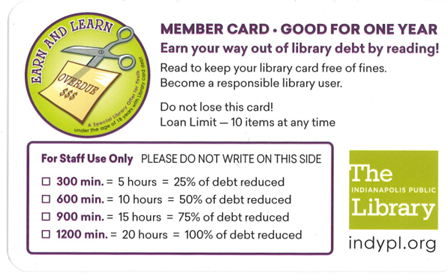
If you have students who have fees, you can offer them a chance to read down their fees and ask them to track their reading minutes in Beanstack (see below for creating an account in Beanstack). You can also track the minutes read on cards, spreadsheets, etc. The goal is to read 1,200 minutes (20 hours). At each interval of 300 minutes (five hours), you and the Library (depending on where the debt came from) will reduce participants’ fees by 25 percent.
How You can Participate:
To find out who is eligible at your school, use the Find Tool in Leap to Find Patrons.
- Choose Account Charges and put in the range of debt to look for, perhaps $5.00 to $1,000.
- Use the filter to choose your library as the Patron’s Registered Library.
- Add a second filter to include only patrons whose cards expire after today through ten years from now.
- Click the magnifying glass to see the list.
- Sort by Patron Code to see who is already in Earn and Learn.
- If you are changing the Patron Code to Earn and Learn, please add a note to the patron account as to which Patron Code they currently have BEFORE updating to Earn and Learn. After completing the Earn and Learn Program we will update back to their original Patron Code.
You may also see the debt as students check out. You may choose to waive fees for items from YOUR location, but not items from IndyPL or other Shared System locations. For example, you might want to waive a $5.00 lost book fee from a book owned by your schools from five years ago.
High school students are “strongly encouraged” to participate as the opportunity to waive debt disappears at 18.
Students may register at school or at the public library. Both sides are asked not to change registration in Earn and Learn (Patron Code Earn and Learn) without consultation once a student registers. During the summer, public library staff will register students. During the school year, Shared System library managers will encourage students to register.
Library manager reviews current debt and approaches students and their families to invite them to participate. The benefits to students and their families should be apparent!
- Participants are allowed to check out any book materials including juvenile, teen or adult.
School Library Managers should only be waiving debt for items owned at their location. Please contact sharedsystem@indypl.org to if your student has completed Earn and Learn and has debt from IndyPL or other Shared System location.
Please feel free to experiment with this at your school. You might use it with lower grade students who need the extra help, or with upper grade students who take longer to finish their books! Students should receive date due slips and verbal reminders when they check out.
- Note that if their debt rises, it still is reduced by the respective percentages.
- Please do not allow siblings, friends or family to accrue points for the student.
Communication with Families
- Schools should send home a note so families know their student is in the program. It might be helpful to send this home with a printout of the student’s account showing the amount of debt and including the list of lost materials.
- When you see a student has read off all their debt, celebrate! School library managers may draft the letter and prepare it. .
- School libraries might include promotional information in parent packets at the beginning of the year and keep a supply on hand for transfers and for those who don’t read everything in their packets!
Opening an account in Beanstack
- Find out whether the student has a Beanstack account
- if yes, ask the student to login
- Ask student to click button that says “Challenge Code”
- Provide the student with the challenge code available from SharedSystem@indypl.org.
- Student enters the challenge code.
- The program will open as a popup.
- Click the button at the bottom right corner that says “Join Challenge” to join the challenge.
- if no, and the student is 12 and under, send home information about Earn and Learn and how to create a Beanstack account (see flyer for details).
- if no, and the student is 13 and over, ask the student to create a Beanstack account, then return to first step
- if yes, ask the student to login
- Student records reading minutes in Beanstack (see flyer for details)
- Student receives an email from Beanstack when 300 minute intervals are reached. (Goal is 1,200 minutes.)
- If student owes money to your location, open the patron record and waive 25 percent of the student’s fees
- Notify sharedsystem@indypl.org when you have waived fees, and/or if fees are owed to IndyPL. IndyPL fees in Polaris and note on the student’s record in Beanstack that they have received the indicated “reward” for the Earn and Learn challenge.
- Use your judgment! If a student signs up today and tells you tomorrow they have finished the challenge, you should be skeptical!
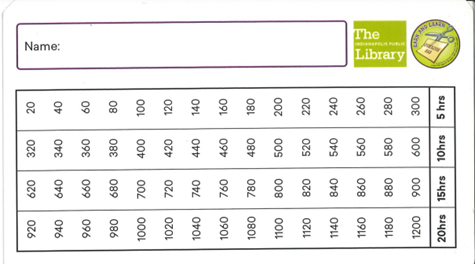
- You may also choose to keep track of minutes on an Earn and Learn card or your own spreadsheet/tracking device.
Earn and Learn Flyers
If you have families who prefer paper tracking, we have the registration form and tracking card for you to download.
Earn and Learn card for paper tracking


You must be logged in to post a comment.